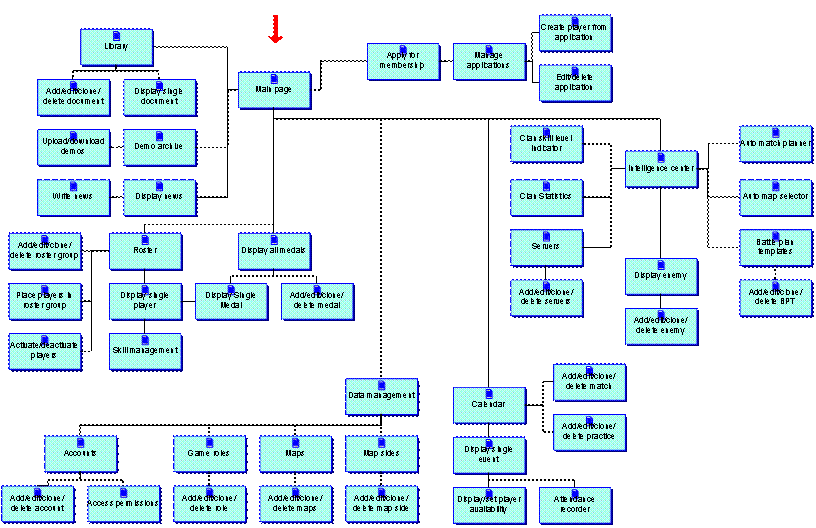
8 Appendix A: GUI Structure
YACHT
Yet Another Clan Hosting Tool
Design Document
Author Thomas Lund
Doc Version 0.1
4.2 Programming Language
for Client Application
4.3 Servlet Engine and
Webserver
5.2 “Not Invented Here”
Syndrome
7.2.1 Basic
data management like accounting and setting up base data.
7.2.2 Managing
players and their individual skills
7.2.6 Intelligence
gathering about enemies
7.2.9 Applications
for new recruits
7.2.10 Battle
Plan Templates (BPT)
7.2.17 Automated
Match Planner
7.2.19 Clan
skill level indicator
7.3 Data Entities and
Structure
|
Version |
Release Date |
Author |
Description |
|
0.1 |
|
TL |
|
Goal of the system is to provide members of a gaming with all the
necessary tools to manage the clan and information around it.
YACHT is not only to be a placeholder like so many other systems, but
also have intelligent automated routines for taking away some of the work
burdens.
E.g. there is an automated battle plan creator that based on the enemy,
map, availability+ and player skills selects who should play what positions.
When finished YACHT will be the only tool necessary for a clan – it will
become focal point for the members as well as from visitors.
YACHT can be used clans playing any team oriented game. It is coded to
being used for a Tribes 2 clan (www.strategical-alliance.org), but nothing is
hard coded against this game. It should be possible to use it without
modifications for e.g. Counter Strike, Team Fortress, Return to Castle Wolfenstein, etc.
The only interface to the system is the YACHT client interface. It is served as web pages to a browser.
Through this interface users can access information like calendar, intelligence information, update e.g. availability, create e.g. matches.
If the user has a username and password his access to
function and information is restricted based on the account model.
It is possible to use this client interface in anonymous mode with limited access.
A modern browser like IE 5+6, Mozilla/Netscape 6
No OS requirements
The entire system will be coded in Java using XML(JDOM) and the echo framework (www.nextapp.com/products/echo)
The code will be run as servlets inside a tomcat servlet engine, but should be able to run inside any java servlet engine available.
Apache running Tomcat servlet engine (jakarta.apache.org)
XML files as the backend
Later move up to a relational db
The system will be developed using the Sourceforge development framework.
Notably we will use
CVS
viewcvs
and the various forums, maillists and file/web hosting capabilities.
On top of this we will be using
Ant
Anthill?
JUnit
Sun Java2 1.4 SE SDK
JavaDoc
Coding will be done using editor and/or IDE of choice.
The code will run as a servlet for ppl to use through a browser.
We will _not_ reinvent the wheel again and again. If a 3rd party has some component that eases development we will use that.
The basic principle will be to use existing components for as much as possible for non-business critical parts.
Business critical parts are defined as the code or data containing our core knowledge.
YACHT itself will be open sourced using the GPL license. It is fine to use open source modules, components, products and tools for all aspects of production.
We will conform to the license restrictions imposed on us by using these tools.
Any modifications to the open source code will be sent to the maintainer as a minimum, but it is not a goal of the project to serve as coders for various half baked libraries. Usage of other tools will be limited to production ready (or close enough) modules.
We will separate presentation, logic and data into multiple tiers.
Presentation will be handled by the clients, logic will be coded as servlets inside the Tomcat engine and data will be stored in the RDBMS (eventually).
All data interfaces in the system will be based on XML with possible exception of the interface to the data storage (RDBMS).
It is not a goal to have a multi lingual interface or support various character sets. English only.
There are 3 levels of user groups in the account model. These are
anonymous, player, and leader.
Anonymous group are people who have not logged into YACHT. This can be
general visitors, enemies or just lazy players who have not entered their
username and password.
Access permissions to the various functions of the system are based on
what group a person is in. Leaders in general have access to all functions,
players a subset and anonymous only view to a small number of public data.
Individuals can be granted extended access to some leader functions.
This is allocated to the individual person and is based on module access.
E.g. the players Aleph_O and Man of Ice are
match planners, so they need to be able to enter battle plans into the system
and have access to the automated match planner module. So access to those 2
modules is granted by the leader.
Below is a matrix of the modules/functions on one axis and the 3 groups
on the other.
|
|
Anonymous |
Player |
Leader |
|
Login |
X |
X |
X |
|
Logout |
|
X |
X |
|
Read news |
X |
X |
X |
|
Write news |
|
|
X |
|
|
|
|
|
|
|
|
|
|
|
|
|
|
|
|
|
|
|
|
Managing accounts for the YACHT system – like creating usernames, passwords for players
Access permissions are also set in here. Individuals can be granted access to the functionality to YACHT in here.
Setting up the game specific base data structures. For Tribes 2 this would be things like e.g. role names (LD, HO, Capper etc.)
Players should be able to manage their own data. Especially they should
select the skill that they have, and select the skill level for each (low,
medium, high experience).
Players also record some data on themselves like IM account info, birth
date, age etc.
See individual statistics for the player like number of matches
attended, attendance in practices, medals, rank etc.
Leaders can give individual players medals. E.g. medal for winning an
important game, perfect attendance etc.
The medal collection can be browsed by all.
Rank, groupings into squads or specialty groups. Making players active/inactive.
Manage enemy data structure (name, website, etc)
Looking at statistics for the clan vs that enemy.
Links to demo recordings for this enemy
Entering various observations about that enemy
Upload, download of demo recordings
Relating a demo to an enemy, a particular map and/or one of the clan players
Write news
Read news
Entering of an application
Managing applications
Managing battle plan templates. A bpt is a strategic guide for how to play a particular map. The bpt contains map name, side of map (if applicable), number of players needed, the text describing how to play and most importantly the roles needed to play this map.
E.g. we have a bpt
for playing a 14 player match on Katabatic’s storm
side. This particular bpt is named “all out HO
assault”, and describes in text how to base rape the enemy into oblivion. For
this the role need is 1
The servers that the clan is playing on are
recorded here giving them a name, and IP and a text to describe them. For each
server there is also an indication if this server belongs to an enemy or the
clan it self.
Matches can be either tournament matches or scrims against friendly
clans. These can be created, edited, moved or deleted from here. Recorded is
the enemy, what maps to play on what servers, the size of the match in number
of players and the date.
A practice session contains a date, what server to practice on and a text describing the practice plan.
Matches and practice sessions are inserted into the calendar.
Players can view the calendar and click into the individual events to see them.
Players must indicate their availability for a calendar event. They are initially placed in a “Lazy bastard” group and must move themselves to either “I’m there”, “Possibly” or “Can’t make it” group.
Leaders can for each event go in and select the actual players who
attended to record their attendance. The leader is displayed the player
availability list, the play list from the match planner and the entire list of
players. He can then mark the players who actually attended and that is
recorded.
This tool is used for creating both a match battle plan and the play list.
Match battle plan is a battle plan template that is “instantiated” – it can be modified afterwards without modifying the template.
The play list is the names of the players who are playing that match. It also indicated what roles each player is assigned to.
For being able to produce this, it needs to take the individual player roles, their experience in each role, a battle plan template and the availability of players. It can from that propose a match battle plan + play list that can be modified by the operator.
Once a plan is accepted it is attached to the event in the calendar.
Extension in the future: send emails out to the chosen players with the plan attached.
A statistical reporting tool for the clan – information available is e.g. matches played, match history, map history, number of players, etc.
The system takes all the roles in the system and the current active players’ individual skills and generates a graph to display what areas the clan is great and where skill is missing.
Can be used as a tool to plan skill improvement practices.
Can be used for selecting the right map for matches.
It takes the current battle plans templates in the system and matches them up against the current active players skills to recommend what plans are good to chose based on this.
Various documents can be placed in this library. Each document is marked with the minimum account group one has to be in for seeing it. E.g. a document marked player can be seen by players and leaders only.
Please see
Appendix A for the GUI structure.